
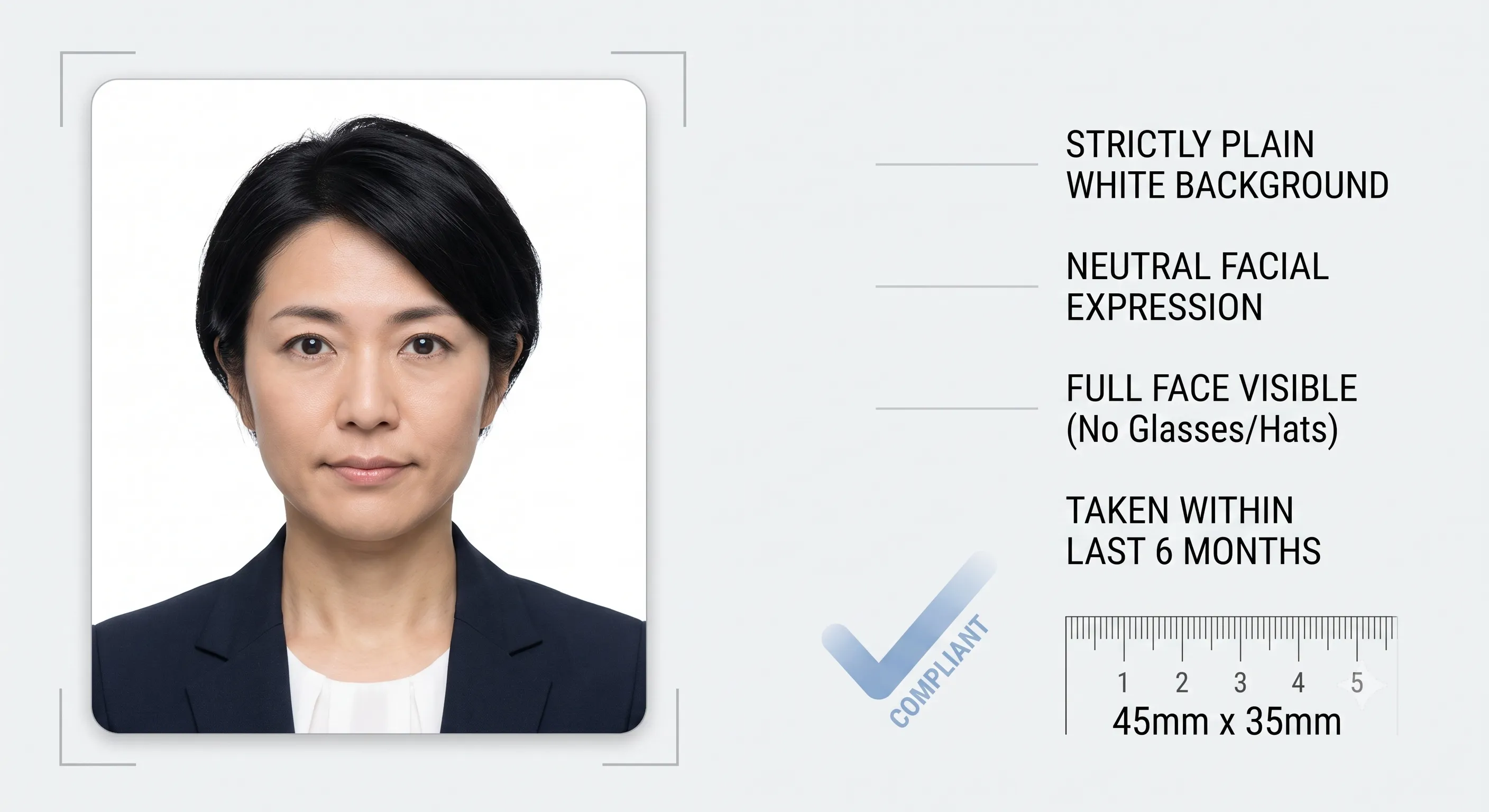
Japan Visa Photo Requirements

Getting your digital photo right is one of the simplest ways to avoid processing delays or rejection in your Japan eVisa application. This guide explains photo dimensions, light background rules, facial framing, and upload guidelines before you submit.

Applying for tourism? Explore our Japan Tourist Visa portal. Indian citizen? Check specific document guidelines on Japan Tourist Visa for Indian Citizens.

Japan eVisa photo specifications and framing guide
Use a recent, clear, and evenly lit photograph taken against a plain light background.
Recency Last 6 Months

Reflecting current appearance

Background Plain Light

No shadows or patterns

Face Ratio 70% to 80%

Centered, neutral expression

Pre-Check Audit 100% Verified

Free photo sizing checks

Photo Audit Japan / Digital Upload Standards • Overview

Quick Photo Specification Summary

Automatic Photo Sizing Check Active Pre-submission verification
  • Image Background: Plain white or light off-white (no patterns)
  • Head Position: Centered, directly facing the camera
  • Facial Expression: Neutral, both eyes open, mouth closed
  • Eyewear Policy: No tinted glasses, sunglasses, or glare
  • File Quality: High resolution, sharp focus (no selfies/filters)
Photo Verified Online

Start Application

Review all government and handling rates on our dedicated Japan Visa Fees page.

Japan eVisa Photograph Specifications

Dimensions are only one part of an acceptable photograph. The digital image must be recent, clear, evenly lit, and easy to match with your passport details:

Digital Photo Size & Framing

The face should take up approximately 70% to 80% of the total frame, measuring from the bottom of the chin to the top of the hair. Do not crop a casual smartphone selfie to an assumed aspect ratio.

Background & Contrast

A plain, solid light background (white or off-white) is required. Avoid patterns, wallpapers, visible home objects, strong color casts, and shadows behind the head.

Head Position & Eye Contact

Face the camera directly with your head centered and level. Both ears and the full facial oval should be clearly visible without hair or accessories obscuring your eyes or eyebrows.

Expression & Lighting

Maintain a natural, neutral expression with your mouth closed and both eyes open. Lighting should fall evenly across both sides of the face without harsh shadows, highlights, or flash reflections.

File Quality & Compression

Upload a sharp, original digital file in JPG or PNG format. Avoid heavy compression, social media screenshots, beauty filters, or low-resolution scans.

Photo Date

Use a photograph taken within the last 6 months that represents your current appearance. Never reuse old visa photos or images from an expired passport.

Best Practical Quality Test: Open the photo file at 100% full screen. If you cannot clearly distinguish eye color, facial contours, or clean separation from the background, take a new photo rather than attempting digital retouching.

Avoid Visa Refusal Due to Photo Errors

Over 25% of visa delays occur because of non-compliant photos. Our team validates and crops your image for you.

Begin Safe Application

How to Take a Japan eVisa Photo at Home

You do not need a professional photo studio. A modern smartphone camera works effectively if you follow these three simple setup rules:

01

Setup Plain Background

Stand about 1 to 2 feet in front of an even, plain light wall to prevent hard shadows behind your head and shoulders.

02

Position Soft, Even Light

Face an open window with natural daylight. Avoid direct bright sunlight, side lamps, or overhead lights that cast dark shadows under your eyes.

03

Eye-Level Camera Capture

Have someone hold the camera at your eye level from 4–5 feet away. Look straight into the lens with a neutral expression.

Japan Visa Photo Do’s and Don’ts

Ensure your photograph meets consular guidelines before uploading to prevent re-submission requests:

What Helps Approval

  • Look directly into the camera lens with your head straight.
  • Keep a natural, relaxed facial expression with mouth closed.
  • Wear dark clothing that contrasts well against the light background.
  • Keep eyes fully open and eyebrows visible.
  • Submit an unedited, high-resolution original digital file.

What to Avoid

  • Selfies taken with front cameras at an upward or side angle.
  • Beauty filters, face-slimming effects, or artificial digital backdrops.
  • Sunglasses, tinted glasses, or thick frames covering the eyes.
  • Hats, caps, or headwear (unless worn daily for religious reasons).
  • Flash glare, red-eye, or low-quality scanned paper photos.

Learn more about how image errors lead to delays in our Japan eVisa Application Rejection guide.

Complete Your Submission Package

Remember that a compliant photograph is only one part of your application package. Make sure you also prepare:

Valid Passport Scan

Bio-page copy with at least 6 months validity from your arrival date. See full passport rules for Japan eVisa.

Financial & Stay Proof

Bank statements, flight reservations, and hotel bookings. Review the Japan Visa Document Requirements checklist.

Expected Turnaround

Standard processing takes approximately 11 business days. Need your visa quickly? Learn about our Japan urgent processing service (+$35.00 add-on) or check the Japan Visa Processing Time guide.

Application Walkthrough

Follow our step-by-step tutorial on how to apply for a Japan eVisa or check live progress on Track Japan eVisa.

Frequently Asked Questions: Japan Visa Photos

For electronic applications, upload a high-resolution digital image with standard 35mm x 45mm proportions (approx. 2x2 inches equivalent aspect ratio) where your face occupies 70% to 80% of the frame. Our upload tool automatically formats and verifies your image dimensions.

It is strongly advised to remove eyeglasses when taking your visa photo to avoid reflections, glare, and frame obstruction around the eyes. If medically necessary, ensure the lenses are completely clear without tint or glare.

Scanning an old photo directly from your passport usually results in low resolution, moiré patterns, or blurred features, leading to rejection. We recommend uploading a fresh digital photo taken on your phone or camera.

Avoid filters, automated AI background cutters, and retouching tools. Consular systems detect digital alterations and may refuse edited images. Take a natural photo in front of a real, plain light wall instead.

Choose simple, dark, or medium-colored everyday clothing that contrasts cleanly against the plain white or off-white background. Avoid white tops, uniforms, or distracting jewelry. Religious headwear is allowed provided the full face from chin to forehead remains visible.

Content disclaimer: Japan visa photograph guidelines and upload formats are subject to immigration authority standards. Our review desk audits file compliance before official submission to avoid processing delays. Last updated: September 2026.