


On this page
Quick answer
Applying for a Brazil eVisa is one online flow with five stages: gather your documents, fill in the form, upload your passport scan and photo, pay the official fee of $80.90 per person, then track the decision and print your approved eVisa. Set aside 20 to 30 minutes and apply 3 to 4 weeks before you fly.
What to Have Ready Before You Start the Brazil eVisa Application
The form itself is quick. The part that slows people down is hunting for files halfway through it, so gather everything below before you open the portal. That ten minutes of prep is what keeps a 20 minute form from turning into a two evening saga.
- Your passport, with the bio-data page (the page carrying your photo and personal details) easy to scan or photograph
- A compliant digital photo: 3.5 x 4.5 cm on a plain white background for the online portal
- A confirmed flight itinerary showing your entry and exit dates, with the flight numbers on it
- Category extras when your trip needs them: an employer letter, an event invitation or vessel documentation
- A credit or debit card for the official fee
- An email address you check regularly, because status updates and document requests land there
Not sure which documents apply to your trip? Start with our Brazil eVisa requirements, and check the Brazil eVisa eligibility rules if you are not certain the eVisa applies to you at all.
Brazil eVisa Application Steps: The Online Form Start to Finish
The whole Brazil visa application runs as one online flow in nine steps. With your documents next to you, most steps take about a minute each.
Step 1: Pick the right eVisa category
Tourism, Business, Transit, Business Event & Expo or Seafarer. Your choice decides which documents you upload later, so match it to what you will actually be doing in Brazil. Getting it wrong here is what forces people to restart.
Step 2: Create your account
You sign up with your email address. The account lets you save progress, come back to an incomplete form and check your status after submitting. Keep the login details and your application reference number somewhere safe, because you'll need that number later.
Step 3: Enter your personal and passport details
Type everything exactly as it appears in your passport: full legal name, date of birth, nationality, passport number. Check each field against the physical passport as you go. Mismatches between the form and the passport are one of the most common causes of delay.
Step 4: Add your travel details
Planned arrival and departure dates, flight information and a short note about your trip. Some portals accept provisional dates, but a confirmed itinerary is the safer pick: your arrival date feeds the passport validity checks, so it should be real.
Step 5: Upload your documents
This is where most hiccups happen, so don't rush it. Upload a color scan of your bio-data page with nothing cropped or glaring, your compliant photo, and any category documents your trip needs. Most portals show a preview: zoom in and confirm nothing is cut off or blurry before you move on.
Step 6: Review the whole application
The portal shows a full summary before you pay. Read your name spelling, passport number, dates and uploads one more time. After you submit, corrections typically mean contacting support, or in some cases starting a new application, so this pass is worth ten slow minutes.
Step 7: Pay the official fee
The official fee is $80.90 per person, paid by credit or debit card inside the form. A facilitation service adds its own fee only if you chose one. The official fee is non-refundable whatever the outcome, and authorities can update it, so check the amount shown in your application before you pay.
Step 8: Track your application
Your confirmation email carries the reference number for the tracking page. Status typically moves from normal processing to an in-check stage, which means a reviewer is actively reading your documents, and occasionally a request for extra documents, before a final decision.
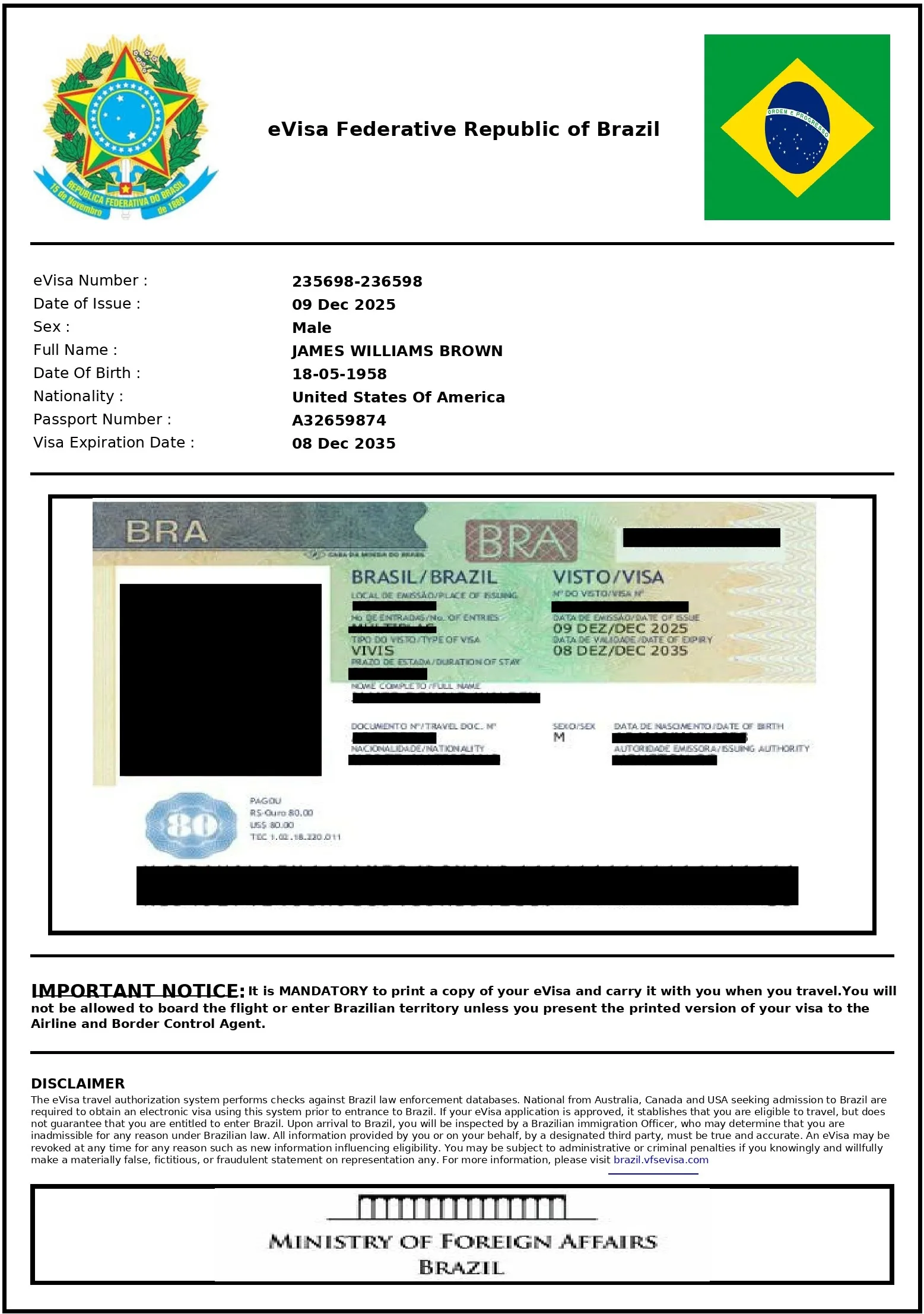
Step 9: Download and print your approved eVisa
Once a decision lands, you get an email and the PDF appears in your account dashboard. Print a physical copy to carry with your passport: airlines check for a valid eVisa before issuing a boarding pass, and officers check it on arrival. Keep a photo on your phone too, just not as your only copy.
That's the full route. If any step above reads as unfamiliar territory, our Brazil eVisa requirements page opens up the document rules behind steps 3 and 5.
Pre-Submit Checklist: Double-Check Everything Before You Pay
By the time you reach the payment screen, most of the application is already locked in. Run this checklist first, because the fee is non-refundable and fixing things afterwards is slow.
First holiday abroad? This checklist is usually the whole job. Our Tourism eVisa page walks through the simplest version of the trip.
Brazil eVisa Fee, Processing Time and When to Apply
Three numbers decide most of your planning: what it costs, how long the decision takes, and when you should sit down and do it.
- Official fee
- $80.90 per person, non-refundable whatever the outcome. The amount can change, so check the figure in your form before you pay. The Brazil eVisa cost page breaks it down.
- Processing time
- Processing runs up to 10 business days, often 2-5 in practice. Cases that request extra documents run longer, which is what the Brazil eVisa processing time page explains in detail.
- Apply ahead
- 3 to 4 weeks before your travel date, and longer if your case carries extra paperwork
- Time to fill
- 20 to 30 minutes with your documents gathered first
2026 note: Brazil's eVisa scheme expanded on 1 January 2026, so more travelers need one than in past years. Application volume typically rises around school holidays, and that 3 to 4 week buffer is what absorbs a slowdown or a request for extra documents without touching your flight plans.
What Happens After You Submit Your Brazil eVisa
Submitting is not the finish line, it's the start of the waiting part. Here is how the process usually runs.
Confirmation email
It arrives with your application reference number. Save it somewhere you can reach from your phone.
Normal processing
Your application sits in the official review queue, and the tracking page shows it as processing.
In check
A reviewer is actively reading your documents. This is the stage where a request for extra papers can arrive, usually by email.
Decision
Approved, and you download the PDF from your account and print it. Refused, and the fee stays spent, though you can reapply with corrected documents.
If a request for extra documents arrives, answer it fast. Slow replies are what stretch timelines. When the approval lands, print two copies of the eVisa and keep a photo on your phone: the airline checks it before your boarding pass, and border officers check it on arrival.
Common Brazil eVisa Application Mistakes to Avoid
Every item below has held up a real application. Two minutes against this list before you pay is the cheapest insurance in the process, and if a refusal already landed, our Brazil eVisa rejection reasons guide maps each reason to its fix.
Frequently Asked Questions
How long does the Brazil eVisa application form take to fill out?
Most applicants finish the form in about 20 to 30 minutes, as long as their documents are already gathered. Hunting for a photo or passport scan mid-form is the usual reason it takes longer.
Can I save my Brazil eVisa application and finish it later?
Yes. Creating an account on the application portal lets you save your progress and return to an incomplete form instead of starting over. Keep your login details and application reference number somewhere safe.
What happens after I submit my Brazil eVisa application?
Your application joins the official review queue and you can follow its status with the reference number from your confirmation email. Stages typically run from normal processing to an active document check, with a possible request for extra documents before a decision. Processing usually takes up to 10 business days, often 2 to 5.
Can my family apply together in one application?
Every traveler, children included, needs an individual application and pays the fee separately. Many portals let you manage several applications from one account, which keeps a family trip tidy.
I spotted a mistake after submitting. Can I fix it?
Contact support through the application portal as soon as you notice it. Depending on the error and how far along the review is, you may be able to correct the details, or you may need to wait for the decision and apply again.
Do I have to use a facilitation service to apply?
No. You can complete the whole process yourself on the official portal and pay only the official fee. A facilitation service is an optional route for people who want their documents checked before submission.
VistoRoute is an independent visa information and facilitation platform and is not affiliated with the Government of Brazil or any consular authority. We help travelers understand eligibility and prepare accurate applications, but all final decisions on visa issuance rest with Brazilian immigration authorities. For official government guidance, always cross-check with your nearest Brazilian consulate.