

On this page
Apply in five steps
Tanzania has issued its eVisa online since 2018, and the form itself has not changed much since. Applications from 133 eligible countries are completed online, 47 nationalities travel visa free, and passports on neither list use the embassy or standard visa route instead. Whatever applies to your passport, the online application runs through the same five steps.
- 1
Create your account
Register with the email address you will use for every message about the application. Each traveller files their own account and submission, even when you are travelling as a family.
- 2
Complete the form
Copy your name, passport number, nationality and dates exactly as they appear on the passport you will travel with, then read the preview. Changes may not be available through the portal once the form is submitted.
- 3
Upload your documents
Attach a clear passport bio page and a recent photograph, plus the supporting papers your visa category commonly asks for, such as a ticket, a booking or an invitation letter.
- 4
Pay the fee
Read the total on the payment screen in the currency you are paying in, complete the payment, and keep the receipt with your application reference.
- 5
Track and download
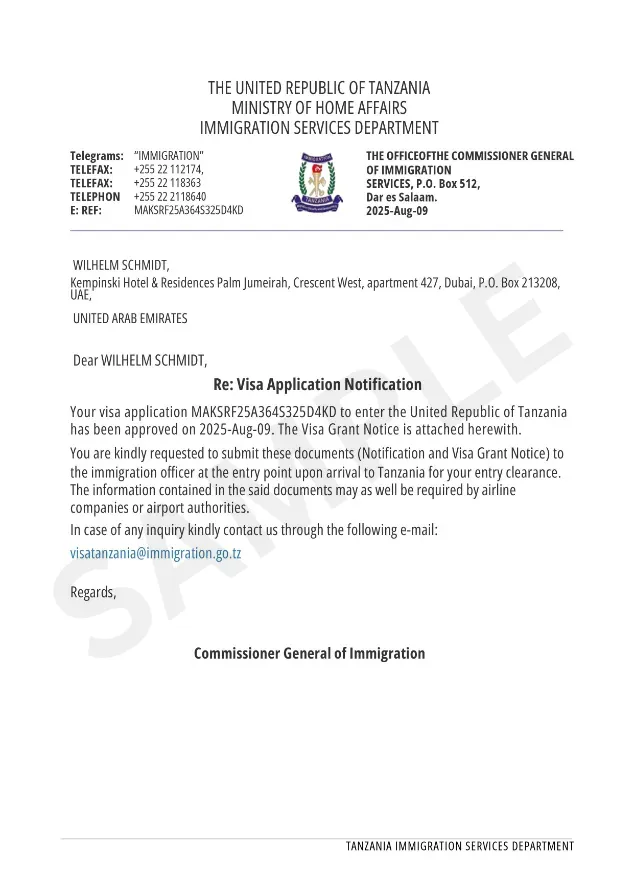
Follow the status in your account until the decision arrives by email. Download the PDF approval, check the name and the dates on it, and print a copy for the airport.
What to prepare before you start
Gather the file before you open the form. Your passport should be valid for six months from arrival and hold at least one blank page, which our passport validity rules explain in full. If your passport is one of the 47 that travel visa free, check the visa exemption list first, because you may not need to apply at all. Then match the category to the trip: the Ordinary single entry visa covers a stay of up to 90 days, US passport holders use the multiple entry visa with 12-month validity and stays up to 90 days on each entry, and a transit visa is valid for 7 days from arrival.
Passport bio page
A clear scan of the page you travel on, with every corner visible and the details readable at full size.
Recent photograph
A recent colour image on a plain background, facing the camera. Photos taken with a phone camera are commonly accepted.
Travel details
Your return or onward ticket, accommodation or invitation, and a purpose that matches the visa category you choose.
Consistent entries
The same name, passport number and dates across the form, the documents and the ticket, checked again for every traveller in the group.
Paying the fee
The visa fee is listed at the amount shown for your category on the payment screen, and it is the figure you should read before you confirm. Fees are commonly non-refundable once an application has been submitted, whether the outcome is approval or refusal. Keep the receipt with your application reference, because you will need both if you contact support or track the file later.
- Listed visa fee
- The amount charged for the visa itself, set by category
- Application assistance
- Separate support for preparing and checking your file
- Payment provider charge
- Card processing and currency conversion, if any
Read the total before you confirm. Fees, exchange rates and service terms can change without notice, so treat every figure on this page as guidance and check the live amount during your own application.
Mistakes that delay applications
After you apply: tracking and approval
Once you submit, the application moves through the same stages every time. The form is completed and reviewed, it is passed on as a government application, status tracking in your account shows where it stands, and the decision is sent to you by email as a PDF. The current assistance guideline is typically within ten days from a complete submission, which is an estimate of timing rather than a decision. Referral cases, incomplete files or a request for clarification may take longer, and applicants on that route are advised to apply at least two months ahead. Our processing time guide explains what each stage usually means.
When the approval arrives, check the name, passport number and dates on the PDF straight away, then print it. On arrival you may be asked for a passport that is valid for six months and for the printed eVisa approval, so keep the paper copy with your travel documents. A Visa Grant Notice is not a guarantee of entry, because the immigration officer decides at the border.
Frequently asked questions
How long does a Tanzania visa approval take?
The current assistance guideline is typically within ten days once a complete application has been submitted. This is an estimate of assistance timing rather than a decision. Referral cases, missing documents or a correction request may add time, and travellers on that route are advised to apply at least two months ahead.
Do I need to visit an embassy?
Most eligible passports complete the process online through the eVisa, which has been available since 2018. Passports on neither the eVisa list of 133 countries nor the visa-free list of 47 nationalities commonly use the embassy or standard visa route instead.
What documents do I upload?
A clear passport bio page and a recent photograph are the core uploads. Supporting papers such as a ticket, a hotel booking or an invitation letter may be requested depending on the visa category you select.
Can I apply on arrival instead?
Some passports can pay at the border, while 47 nationalities travel visa free and need no visa at all. If your passport appears on neither list, or your case falls under referral, applying online beforehand is typically simpler. Entry is decided by the immigration officer at arrival.
What if my application is refused?
A refusal means the visa was not issued for that application. The fee is commonly non-refundable when the outcome is refusal, and you may start a fresh application with corrected details and complete documents.
Is the visa fee refundable?
Visa fees are commonly non-refundable once an application has been submitted, whether the outcome is approval or refusal. Check the refund terms displayed on the payment screen before you pay, as they can change without notice.
Content Disclaimer: This page is general guidance based on the Tanzania Immigration Services visa guidelines and was last reviewed on 21 October 2026. VistoRoute is an independent visa information and application-assistance service. We do not issue visas or decide approvals. Fees, eligibility lists and entry rules can change without notice, so confirm the latest requirements on the Tanzania Immigration portal, with your airline and with border authorities before you travel. A Visa Grant Notice is not a guarantee of entry.